


21.5 Inch Digital Calendar, Electronic Chore Chart, Smart Weekly and Monthly Planner 1920 * 1080P IPS Touchscreen Wall and Desk Calendar for Family Schedules, Black
Original price was: $399.99.$246.99Current price is: $246.99.



From the brand


【🖥️ 21.5″ Digital Calendar Wall Touch Screen – Crystal-Clear Display】Experience vibrant colors and sharp details on the 1920x1080P IPS touchscreen with wide viewing angles. Perfect for tracking summer calendar activities, daily calendar 2025 plans, and family schedules—all at a glance.
【🌟 2-in-1 Smart Calendar & Digital Photo Frame】Manage your appointment calendar by day, then enjoy a slideshow of cherished memories when idle. Perfect for displaying summer calendar vacation pics or everyday joys—all on a vibrant 21.5″ touchscreen
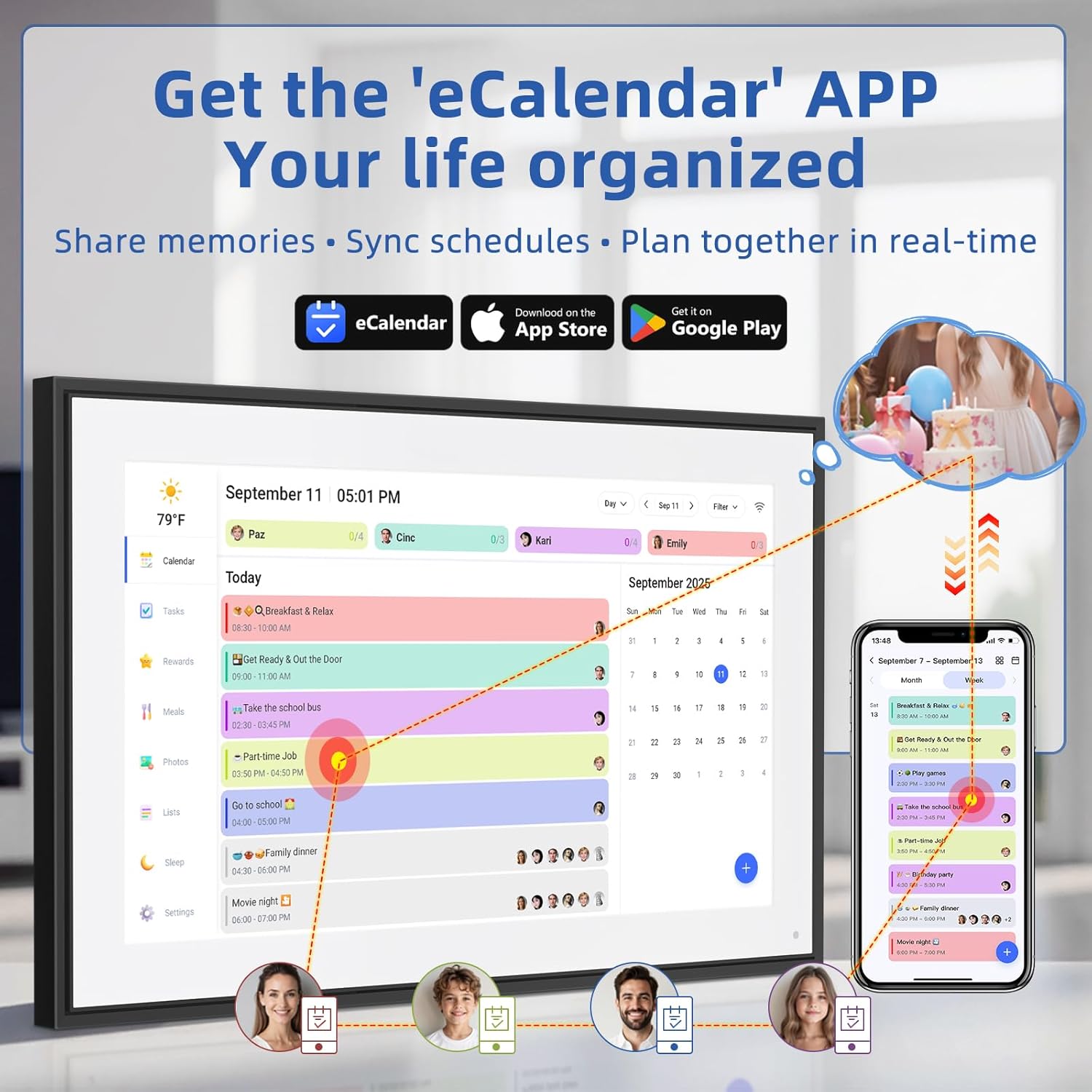
【 🗓️ All-in-One Smart Calendar & Family Planner】More than a basic digital calendar—sync chores, appointments, and events in one place. Color-coded profiles, appointment calendar reminders, and progress tracking keep everyone organized.
【👆 Intuitive Touchscreen Controls – Easy to Use Daily】No complicated menus—just tap to add/edit events, set recurring tasks, or check off chores. Syncs with smart calendar apps (Google/iCloud/Outlook) for seamless updates.
【⚙️ Versatile Mounting – Use as a Wall or Desk Smart Calendar】Set up your electronic calendar anywhere! Includes both wall-mount hardware and an adjustable stand for flexible placement in kitchens, offices, or bedrooms.
10 reviews for 21.5 Inch Digital Calendar, Electronic Chore Chart, Smart Weekly and Monthly Planner 1920 * 1080P IPS Touchscreen Wall and Desk Calendar for Family Schedules, Black


Miss Tock –
Great for busy families and reminders for older parents!
This Family Calendar & Digital Planner is great! The 10.1″ touch screen is bright and easy to use, even for those who aren’t tech-savvy. The size is perfect for my small kitchen and I can move it around if needed. I love how each family member gets a color-coded schedule, no more missed appointments or confusion!What I really love about this is how perfect it would be for older folks and ones in nursing homes. I bought one for my mom and she loves seeing all the recent photos we send. We easily sync schedules for visits, medication reminders, and activities. It’s a thoughtful way to keep everyone connected and informed.Setup is quick, the app is user friendly, and the built-in chore chart and grocery list make daily routines smoother. The price is great and it keeps the entire house connected! I’m loving mine so far!
Brandon Williams –
Essential Family Hub & Perfect Picture Frame
I’ve had this 10.1-inch smart calendar for almost a month, and it’s been a great addition to the family. It immediately became our command center. The setup was quick, and it instantly synced all our family schedules from Google and Apple calendars into one organized, color-coded display.The calendar really helps with the day-to-day chaos, especially with the chore chart and meal planner features. Best of all, it’s a perfect upright digital picture frame when not in active use. It beautifully displays photos and videos, sent easily through the app, without looking bulky. If you need a stylish way to simplify your schedule and showcase memories, this device is a huge win. Highly recommended!
Jacob N. –
Fantastic so far!
My husband splurged on the bigger size for Mother’s Day, and the screen quality is excellent. The white frame is beautiful, the touch screen works well, the screensaver pictures look great. All the kids love seeing the pictures on screensaver and they were very easy to add.The app is intuitive and easy to use. After syncing my main Google calendar I thought I found a deal breaker when the entire calendar uploaded in one color even though different events were set as different colors in my Google calendar. BUT I found an easy solution within a few minutes to get it to work how I want. I already have a gmail account for each of my children, so I went into the Google Calendar app, and created a calendar under each of their accounts.If you want each person to have a different color and sync seamlessly from Google calendar here is what you need to do:1. (Create a gmail account) and then create a Google calendar for each person.2. Select the first person’s account in the upper right circle in Google calendar, then click the hamburger drop down on the upper left corner in the month view and go to settings. Select the default color you want.Create at least one event in each Google calendar for it to work properly.Repeat for each person, choosing the color you want for each.3. Go to the eCalendar app, and add all of those accounts in the sync section.4. Go to the profiles in the eCalendar app and click on each calendar to change the color to same color you selected in Google calendars.Et voila!Now each person will have separate colors for all of the events as long as when you add a new event it is added under the correct google account in Google Calendar (the circle at the top right of google calendar app).You will also want to create profiles in the eCalendar app for each person, with all of their same colors, for things like their tasks (chores). Ex: I have 12 profiles for 5 people (5 are the calendars, 5 are for tasks, and added US holidays calendar and was able to add a shared soccer team schedule.)It’s going to take me a little while to remember to make sure I am under each person‘s google account when I create a new event, but after I get used to that, it will be easy peasy. Then the calendars sync seamlessly with your digital calendar. Now when I add an event it pops up on my digital eCalendar in 3 seconds.Also, the older kids love the chore lists. Now I don’t even have to tell them what to do when they get home from school, and it’s easier and more fun for them to check this digital calendar and then check their chore done rather than having Mom “boss them around”. They respond to it much better. The chore list also helps me remember what I want them to do and be able to rotate through chores easily – I usually know what chores I need done at 10 AM and by the time they get home, I forget. It’s nice you can have chores repeat any number of days, weeks or months.I haven’t used the dinner planning function yet.Cons: app dependent.
Ohio –
Excellent Digital Calendar / Kids Task Incentivizer!
I was looking for a more affordable alternative to the high-priced “Skylight” Calendar and found this while scrolling. It’s the PERFECT entry level price point for families looking to keep organized and keep their kids engaged in tasks throughout the week, without having to buy additional apps to support these features which are included for free! Setup was fairly intuitive and I only needed to consult the instruction manual once. Within an hour, I had synced my Google calendar, assigned tasks for my son for the day/week, setup grocery lists and setup a rewards system. My son loves to check and see what’s “on the list” for the week! The coolest feature? REWARD STARS! So, you can “gamify” tasks/chores by assigning a point/star value to each task. This can only be done on the app so kids using the calendar can’t increase the star value by themselves – they can just check off whether it was completed. Then, the cool thing is you assign stars to a reward(s) which the child can accumulate to redeem for! We chose to reward with dollars (5 stars earned = $1.00) but also encourage to save more stars to cash in for higher dollar amounts. Again – but hit with the kids here!!! It would be cool to add a photo to the rewards if you kiddo wants to earn a special toy or something. Maybe in an upgrade 🙂 Easy functionality, and it’s a quality calendar with the features that I wanted for our household. Syncing is nearly immediate which is also great. I can see us upgrading to a lager screen version in the future because I think this will be used a lot in the house!!
Sundeep –
Great Organizer!
This digital calendar is really good! The display is bright, clear, and easy to read, and the touchscreen works smoothly. It’s perfect for keeping our family organized — everyone can see the schedule at a glance. Setup was simple, and the design looks modern and clean on the wall. Highly recommend it for anyone who wants an easy and smart way to manage daily tasks and events!
Dianne Casamayor –
Shipped me an item that has been previously returned or damaged! Touch screen does not work. DO NOT BUY
joe –
Great product
Nadine Lebel –
Tres bon produit
Jen –
Got this calendar for Christmas and so pleased with all its functions. Share the family grocery list in real time and adding and changes to everyone’s schedules. It’s a game changer! Picture option is cute and a few others we haven’t yet explored.
Richard P –
Love it